Your competitors are already doing it. Right now, another Amazon seller in your category is running Google Ads. They’re capturing the search traffic you’re missing, building brand awareness, and scaling faster than you. Understanding the right Google Ads types can help Amazon sellers create a stronger strategy and compete more effectively.
Why? Because they understand something most Amazon sellers don’t: Amazon PPC and Google Ads are a two-channel strategy. Amazon PPC is defensive. It protects your market share, while Google Ads is offensive. It captures new demand before your competitors even know it exists, creating an unfair advantage for sellers ready to scale.
Google Search Ads
Credit: instapage.com
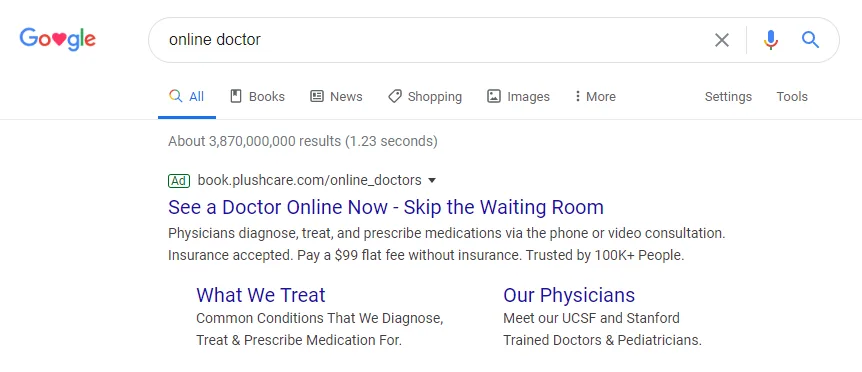
This is the bread and butter of Google Ads management.
Search campaigns use text-based ads. They show up at the top of Google results. When someone types “best wireless headphones,” your ad appears right above everything else.
For Amazon sellers, Google Ads for Amazon listings is pure gold.
Why? Because search intent is already there. The person is looking. All you have to do is show up and capture that ad showing when people need what you sell.
You get two options within search campaigns:
- Responsive Search Ads – Google mixes your headlines and descriptions automatically. It finds the best combo for each search query. This is the default ad format for most Google Ads accounts.
- Dynamic Search Ads – Google scans your Amazon listing. It creates ads automatically based on your content. Perfect if you have hundreds of products or services to promote.
Start with responsive search ads. They give you more control over your messaging.
Pro tip: Use Amazon Attribution to track which keywords actually lead to sales. Don’t guess. Measure everything.
Google Shopping Ads
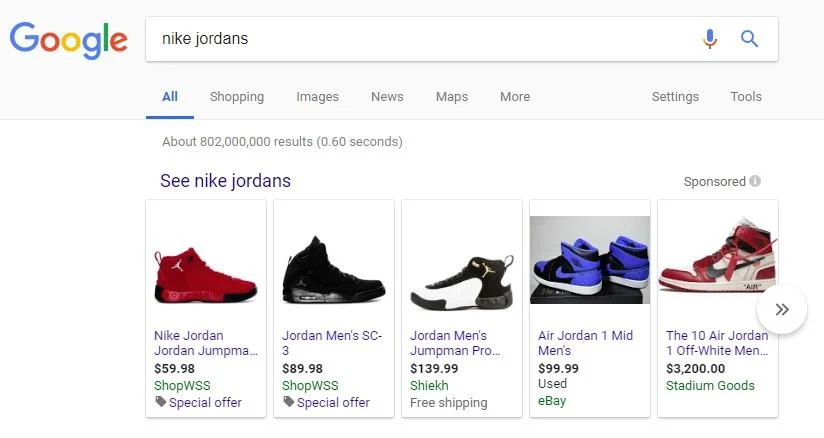
Credit: wordstream.com
This is the most visual type of Google Ads for product sellers.
Shopping ads show a photo, a price, and a store name. They appear right at the top of Google search results. No text needed, just a clean product display. This ad type is specifically designed for e-commerce.
If you want to know how to run Google Ads for Amazon products, let me tell you that Shopping ads are essential.
Why? Because people can see your product before they click. They already know the price, and they are pre-qualified buyers ready to make a purchase decision.
The setup requires Google Merchant Center. You’ll upload your product feed there. Then link it to Google Ads accounts and your campaign.
- What to know: Shopping ads usually have a lower cost per click than search ads. But they need good product images. Bad photos = bad CTR. Simple as that.
Google Display Ads

Credit: demandcurve.com
Display ads are the banner ads you see everywhere. On news sites, blogs, YouTube, and apps across the Google Display Network.
They don’t capture search intent as Google Search Ads do. They create brand awareness instead. This ad format works differently than search campaigns.
For Google Ads on Amazon, display campaigns are best for two things:
- Retargeting – Someone visited your Amazon listing but didn’t buy. You show them a banner ad on another website. They remember you, and they come back.
- Cold audiences – New people who don’t know your brand yet. You show up in front of them anyway across the Google Display Network.
The Google Display Network reaches over 90% of internet users. That’s massive reach for building brand awareness.
But be careful. Display ads have lower conversion rates than search ads. Don’t expect instant sales. Use them for the top of your funnel. Think of this as part of your broader Google Ads management strategy.
Pro tip: Start with retargeting only in your display campaigns. It gives you the best ROI for Amazon products initially.
Don’t let warm shoppers disappear after one visit. Captora Management can help you use all types of Google Ads to retarget potential buyers, build brand awareness, and drive more qualified traffic to your Amazon products. Our Google Ads service makes sure your products are visible on the right platform to the right audience.
Google Video Ads (YouTube)
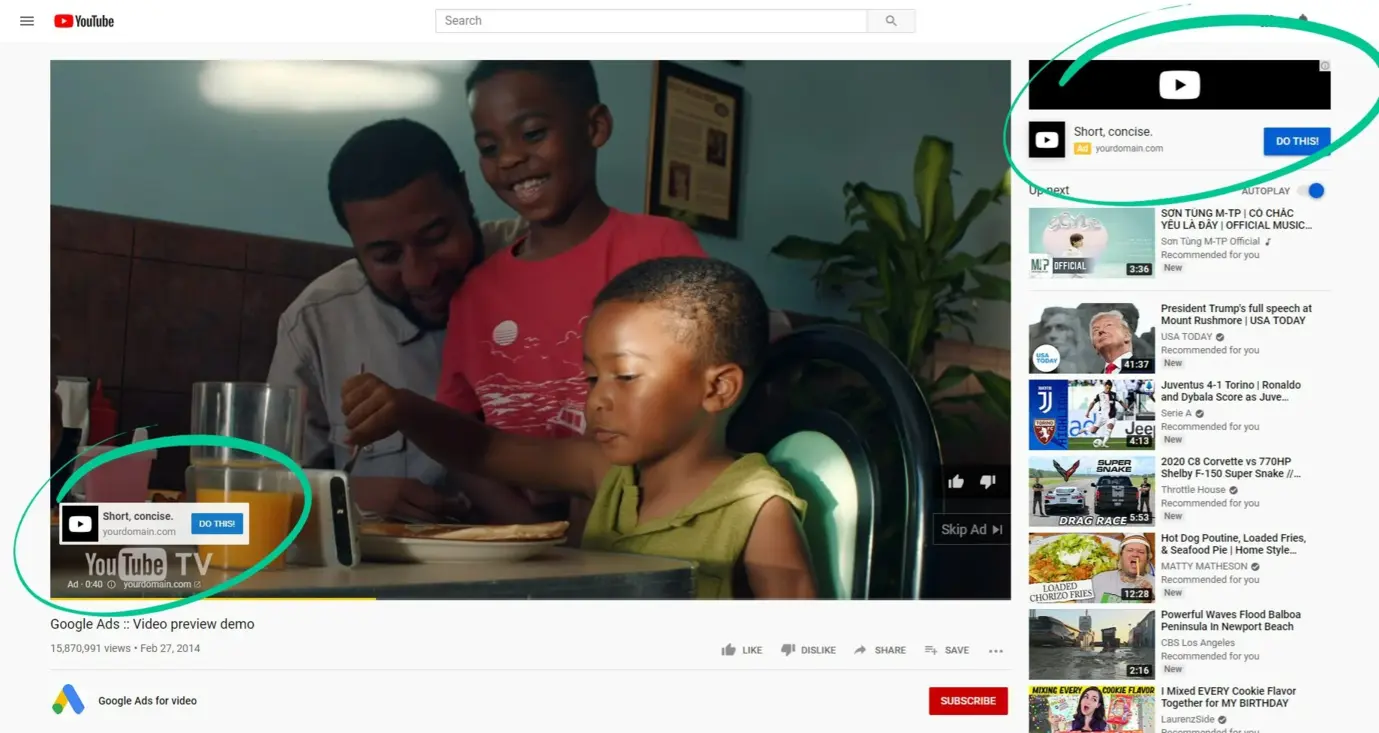
Credit: yeezypay.io
YouTube is the second largest search engine in the world.
Video ads let you show your product in action. That’s powerful for the Amazon platform.
The best ad type for you? Skippable in-stream ads.
They play before a YouTube video. Viewers can skip after 5 seconds. If they stay, you know they’re interested. This ad format works great because people self-select their level of engagement.
What works for Amazon: Product demos, unboxing videos, and comparison videos. Show the product solving a problem.
Keep your video ads under 30 seconds. Most people won’t watch longer. Your ad campaigns should focus on quick, punchy demonstrations.
Use the video to drive traffic to your Amazon listing. Or to a landing page that redirects. Either way, you’re capturing attention.
- One more thing: YouTube video ads work great for retargeting too. Show your ad format to people who already looked at your product.
Performance Max (PMax)
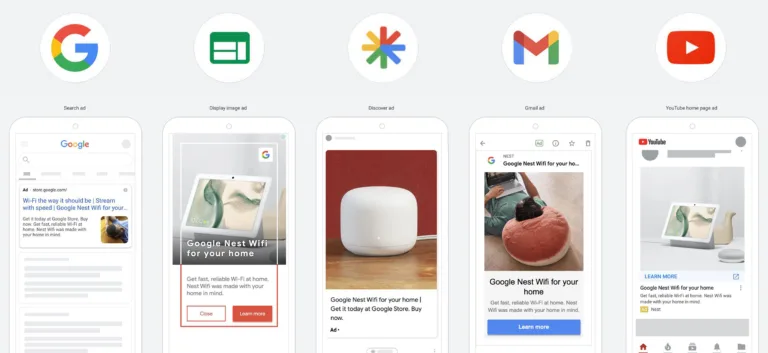
Credit: thecreativecollective.com.au
Performance Max campaigns are Google’s all-in-one campaign type.
It combines Search, Shopping, Display, YouTube, Discovery, and Gmail all in one Google Ads campaign. Google’s AI decides where to show your ad across all types of ads in Google.
For Google Ads on Amazon products, PMax is both powerful and tricky.
- The upside: Google optimizes across ad campaigns automatically. You give it your budget, your creativity, and your product feed. It does the rest. No need to manually manage multiple campaign types.
- The downside: You can’t see where your spend goes. Google keeps it in a black box. You lose transparency on which ads actually drive sales.
So use Performance Max campaigns carefully.
Start with a small budget. Let it run for two weeks. Check Amazon Attribution to see if sales actually came through because this data matters. Many Google Ads marketing agency professionals recommend this cautious approach.
Performance Max replaced Smart Shopping campaigns. It’s the future of automated ads. But don’t rely on it alone in your Google Ads management strategy.
Discovery Ads
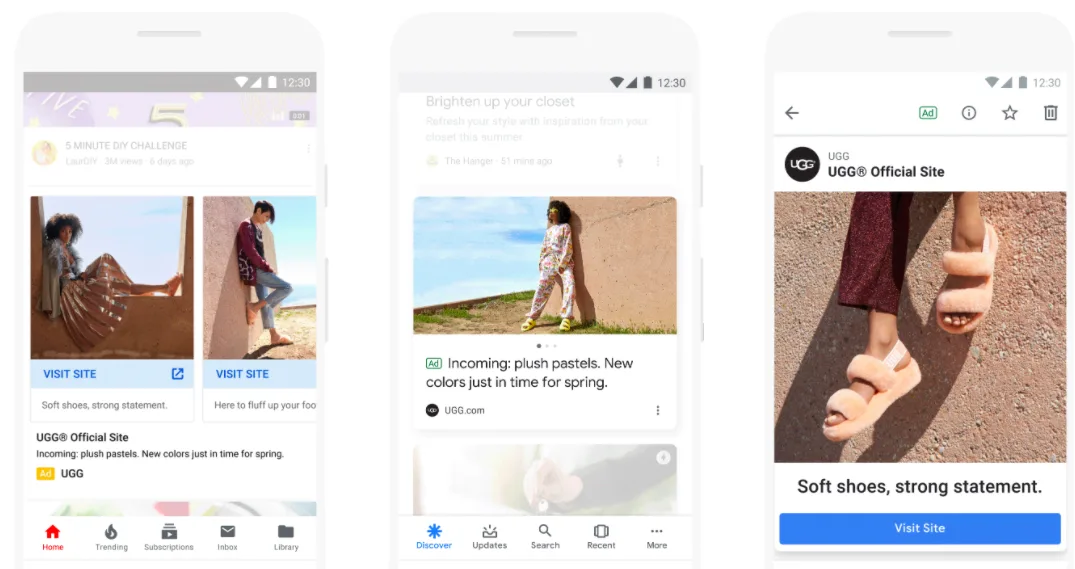
Credit: evolutiondigital.ie
Discovery ads appear in three places:
- Google Discover feed, the feed you see when you open Chrome on mobile
- YouTube home feed
- Gmail Promotions tab
These are visual ads. They use your images and text. Google’s AI finds people who might be interested. This ad format is less aggressive than search ads.
For Amazon, Discovery ads are great for reaching people who aren’t searching yet.
Someone reads about fitness on Google Discover. Your protein bar ad shows up. They click and land on your Amazon listing. You’ve captured a new potential customer.
- Best for: New product launches and seasonal promotions. Different types of Google Ads each have their moment. Discovery is yours for awareness.
The targeting is automatic. You give Google your audience signals. It finds similar people. This is part of Google Ads management that requires less hands-on work.
Keep your creative clean. Use lifestyle images. Show the product in context. Make it aspirational.
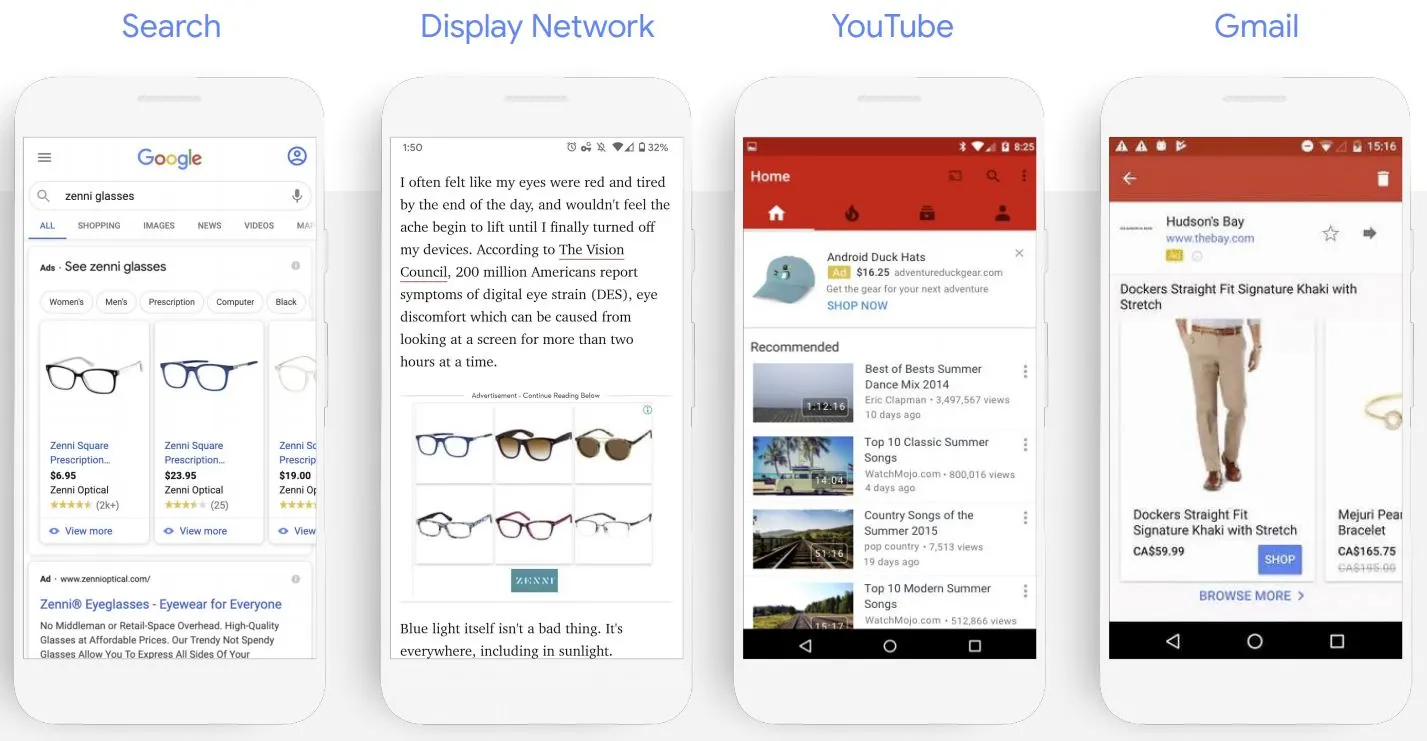
Smart Campaigns
Credit: tinuiti.com
Smart campaigns are Google Ads’ simplest type.
They’re designed for small businesses and beginners. You set a goal, a budget, and some basic info. Google handles the rest. This ad type is the easiest entry point into Google Ads accounts.
For Amazon sellers just starting with Amazon products, this is your training ground.
- What you get: Your ads show on Search, YouTube, Gmail, and Maps. Google optimizes everything automatically across all types of Google Ads ads. No need to understand complex campaign types.
- The trade-off: Less control. You can’t choose specific keywords manually. You can’t adjust bids at the keyword level. You’re relying on Google’s AI to make decisions.
Think of smart campaigns as training wheels. Use them to learn. Then move to more advanced campaign types.
- Budget recommendation: Start with $10–$20 per day. Run for 30 days. Analyze results with Amazon Attribution. This keeps your Google Ads cost low while you test.
- Pro tip: If you’re new to marketing, Smart campaigns remove the learning curve from Google Ads management services.
App Campaigns
Do you have a mobile app for your Amazon brand?
If yes, you need App campaigns.
App campaigns promote your app across Google’s entire network. Search the Play Store and YouTube and discover and display ads across the Google Display Network.
Google automatically finds users likely to install or engage with your app. This ad type handles the targeting automatically.
Two objectives:
- App installs – Get new users to download your app
- App engagement – Get existing users to take action inside your app
For most Amazon sellers, this is a bonus channel. Not a priority. But if you have an app with good reviews, it’s worth testing through a Google Ads management agency or internally.
No creative work needed. Google takes your app store data and builds the ads for you. This is simplified Google Ads management at its finest.
Your products or services get promoted automatically. No manual ad creation required.
Which Google Ads Types Should You Start With?
If you’re just starting with Google Ads, here’s my advice.
- Step 1: Run search campaigns and Shopping ads first. These will give you the fastest results. Google search ads capture immediate intent.
- Step 2: Add display ads for retargeting. Capture the people who clicked but didn’t buy. Use the Google Display Network to stay in front of them.
- Step 3: Test video ads and Performance Max campaigns once you have consistent sales. Build on your foundation.
- Step 4: Add Discovery and Smart campaigns for scale. Expand your reach gradually.
- Step 5: App campaigns only if you have an app with real engagement.
The order matters. Don’t jump into everything at once. Start with Google Search Ads, master those, then expand your Google Ads accounts strategically.
Ending Remarks
Google Ads is not a replacement for Amazon PPC. It’s a complement.
Think of it this way. Amazon PPC captures demand inside Amazon. Google Ads captures demand outside Amazon. Together, they form a full-funnel strategy.
Amazon handles the bottom of the funnel, people ready to buy. Google handles top and middle, people discovering and comparing.
Frequently Asked Questions
Got questions about Google Ads types for Amazon? Here’s what sellers ask most.
Can I track Google Ads sales on Amazon?
Yes. Use Amazon Attribution. It’s a free tool from Amazon and shows you exactly which accounts and campaigns drive sales.
Which Google Ads types are best for Amazon sellers?
Google Shopping Ads and search campaigns with responsive search ads. They capture high-intent buyers. They also have the highest conversion rates for Amazon products.
Do I need a big budget to run Google Ads for Amazon?
No. Start with $10–$20 per day. That’s enough to gather data on your Google Ads campaign. Once you find profitable keywords and understand your ad shows, scale your budget gradually.
Is Performance Max good for Amazon sellers?
Yes, but with caution. Performance Max campaigns are powerful but opaque. You can’t see exactly where your ads show. Use Amazon Attribution to verify real sales. Start with a small budget. Many marketing agencies recommend testing PMax after mastering search campaigns.
How is Google Ads different from Amazon PPC?
Amazon PPC targets shoppers already on Amazon. Google Ads targets shoppers on Google, YouTube, and other sites. Use Amazon PPC for capturing existing demand. Use Google Ads for creating and capturing demand outside Amazon.